
[ Scheduling ]

Therapy Scheduling Software

Keep every appointment on one practice calendar. Manage recurring sessions, reminders, cancellations and no-shows, and let clients request bookings themselves.

Header image
[ Tutorial ]

Scheduling features

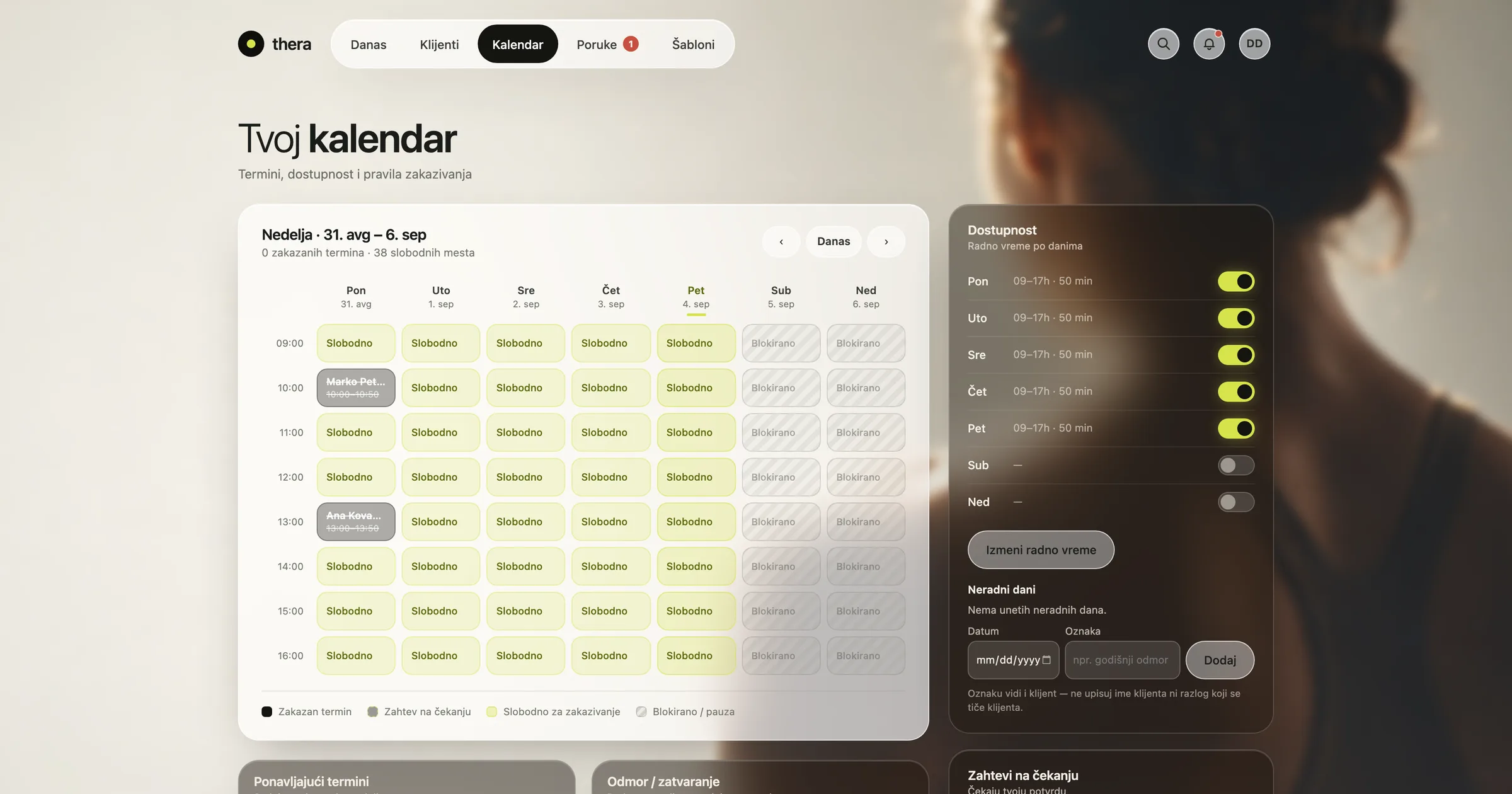
Macbook mockthera calendar - weekly view with availability
Recurring Sessions

Rebooking the same client every week by hand is easy to get wrong. thera lets you set up a recurring session once, with the pattern, duration and clinician already in place.

  • Flexible Recurrence: Set weekly, biweekly or custom patterns once and let the calendar handle the rest.

  • Easy Adjustments: Move or cancel a single session in a series without breaking the pattern.

  • Clash Prevention: The calendar flags overlapping bookings before they happen.

[ Practice management software ]

A calendar built around how therapy practices actually book

Small abstract cube image.

Stay on top of every appointment

  • See your whole practice's calendar at a glance, with one click through to any appointment's details.
  • Colour-coded session types make it easy to scan a busy week and spot gaps or clashes early.
  • Recurring sessions and cancellations sync in real time, so every clinician works from the same calendar.
Small abstract cube image.

Cut down on cancellations and no-shows

  • Save time on scheduling admin with recurring sessions that book themselves after the first appointment is set.
  • Automated reminders by email or SMS cut down on missed sessions and last-minute cancellations.
  • A built-in waitlist automatically offers freed-up slots to clients who are waiting for an earlier appointment.
Small abstract cube image.

Let clients book themselves

  • Track cancellation and no-show patterns over time to see where your calendar needs adjusting.
  • Clients request their own bookings from an available-slots view, so fewer requests go back and forth by phone.
  • Automated waitlist and reminder rules cut down on the manual work of rebooking a cancelled slot.
[ What makes us stand out ]

What makes thera different

Ready from day one

thera's scheduling tools come preloaded with templates built around therapy practice — appointment types, recurring sessions and reminder rules — so your team can start working the way clinicians actually work, from day one.

Built for therapy practices

We build for the way psychology practices actually run. Every feature is designed around scheduling, clinical documentation and client care, not adapted from a generic business tool.

Straightforward onboarding

Setup is guided step by step, from configuring your calendar and templates to inviting the rest of your practice, so you can move from sign-up to your first booked session without a steep learning curve.

Kept up to date

thera keeps pace with how practice management software needs to evolve, adding capability without disrupting the workflows your practice already relies on.

Shaped by the practices that use it

thera is shaped by ongoing feedback from the practices that use it, and we keep listening as your needs change.

Abstract banner
[ thera at a glance ]
Art. 9Health data handled under GDPR
AES-256Encrypted clinical records
Per-practiceData isolation between practices
By designBuilt with a practising psychologist
[ FAQ ]

Frequently asked questions

Find out more
[ One platform. 360º visibility. ]

Run your whole practice calendar from one place

Practice Overview

See sessions per week, attendance, and workload by day and hour, with a clear view of what still needs review.

Session Notes

Structured session notes, a full client dossier and encrypted clinical text — with templates, anamnesis and a clear split between internal and shared notes.

Progress Tracking

Track long- and short-term goals to completion, follow measurable variables session by session, and see charts and patterns across episodes of care.

Outcome Measures

Administer standardised questionnaires and outcome measures in the app. Scoring is automatic, and results sit on the client's timeline alongside session notes.

Video Sessions

Hold 1:1 video therapy sessions directly inside thera. No separate meeting link — the session sits on the client record, ready for the note that follows.

Billing and Payments

Set a price per session, track payments per client, and see what's settled and outstanding across your practice.

Client Portal

Give clients their own view of their plan, homework, and appointments, with self-booking and secure messaging, on phone or desktop.

[ Join the thera Community ]

Built with a practising psychologist

Join those who have put their trust in us